Field notes / React Native / WebView / iOS / Debugging
Debugging mobile WebViews: New Relic, an invisible iframe and an iOS crash

A React Native app crashes shortly after login. Only on iOS. The API returns the correct URL, the page works in a browser, and reinstalling the app helps - at least for a while. The logs show: about:blank is not a file URL.
This is a story about debugging React Native WebView with Xcode and Safari Web Inspector. It starts with a native exception, leads through a temporary iframe created by New Relic Session Replay, and ends with two bugs: one in react-native-webview and one in the app. Together, they turned an invisible frame into a crash of the entire application.
To trace the problem and document it here, I built a sandbox: a web page with New Relic Session Replay displayed inside a mobile app. The mobile app includes conditional page loading and visible logs. You can find the repository on GitHub. All logs shown in this article come from the sandbox app.
The public sandbox currently pins react-native-webview 13.16.2, React Native 0.86.3, React 19.2.3 and New Relic SPA recorder 1.323.0. I tested the sandbox on iOS 18 and 26. These are the sandbox's versions, not a claim about the app in which the issue was first observed. I proposed the native fix in react-native-webview PR #4045.
1. An iOS crash that disappeared after reinstalling(?)
To understand the app's architecture, imagine a mobile app whose Home screen is a PWA inside a WebView. The same navigation stack contains a PAGE screen, used to open other links as new screens within the app:
navigation.navigate(Root.PAGE, {pageUrl})
With that context, here is the symptom: the iOS app crashes after login. Familiar parts of the Home screen, such as the bottom tab bar, appear, but the screen itself is white. A fraction of a second later, the app crashes. Reinstalling makes the problem disappear.
I build the app in Xcode and reproduce the steps. Xcode highlights the native exception:
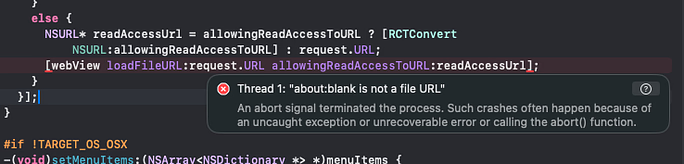
The stack trace from the sandbox build shows the same failure:
[CoreFoundation] *** Terminating app due to uncaught exception
'NSInvalidArgumentException', reason: 'about:blank is not a file URL'
*** First throw call stack:
(
0 CoreFoundation 0x00000001804b910c __exceptionPreprocess + 172
1 libobjc.A.dylib 0x0000000180092da8 objc_exception_throw + 72
2 CoreFoundation 0x00000001804b901c -[NSException initWithCoder:] + 0
3 WebKit 0x000000018c4a8184 -[WKWebView loadFileURL:allowingReadAccessToURL:] + 140
4 FrameLabBroken.debug.dylib 0x00000001056254f0 __29-[RNCWebViewImpl visitSource]_block_invoke + 928
5 FrameLabBroken.debug.dylib 0x000000010562bebc -[RNCWebViewImpl writeCookiesToWebView:completion:] + 412
6 FrameLabBroken.debug.dylib 0x000000010562c418 -[RNCWebViewImpl syncCookiesToWebView:] + 148
7 FrameLabBroken.debug.dylib 0x00000001056250a0 -[RNCWebViewImpl visitSource] + 1196
8 FrameLabBroken.debug.dylib 0x00000001<…>
Xcode points to a specific location in WebView's native code.
I also ask for Jetsam logs from affected devices. It turns out this crash does not generate any.
The app appears to close on its own while loading Home, without the user tapping a link. The captured error is native: NSInvalidArgumentException and the stack containing loadFileURL confirm that.
My first suspicion is that the API is returning an invalid URL that ends up being treated as about:blank, or that the API is returning about:blank directly.
In this case, the API returns a valid URL that works in the browser. I reinstall the app, and it does indeed work.
I restore the previous state so I can keep investigating the crash. To follow the URL through the entire process, I add logs throughout the app's WebView flow, from fetching the URL from the API to loading the page. The URL and its handling look correct, yet WebView still tries to open about:blank, crashing the app.
2. Why WebView tries to open about:blank as a file
In the React Native WebView code involved in this crash, iOS URLs without a hostname are treated as local files (file://). Trying to open about:blank therefore takes the loadFileURL path. It is not a local file, so the app crashes with:
*** Terminating app due to uncaught exception 'NSInvalidArgumentException',
reason: 'about:blank is not a file URL'
The simplified code looks like this:
if (request.URL.host) {
  [webView loadRequest:request];
} else {
  [webView loadFileURL:request.URL
      allowingReadAccessToURL:readAccessUrl];
}
The first fix is a patch that stops about:blank from being opened as a local file.
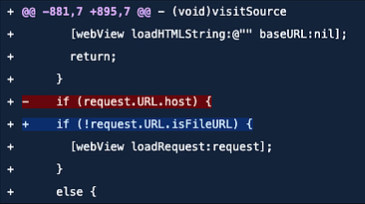
It is also worth adding a guard on the TypeScript side:
export const isEmptyWebViewUrl = (url: string | null | undefined): boolean =>
  !url?.trim() || /^about:blank(?:[?#]|$)/i.test(url.trim())
This filter blocks this case before a new screen opens.
3. The logs: an iframe becomes app navigation
Preventing the crash does not explain the origin of about:blank. To trace that path, I use logs from the sandbox reproducing the bug without the guards.
native.navigation
request=about:blank
mainDocument=https://dewxit.github.io/new-relic-in-ios-webview-session-replay-issue/?replay=on
sourceMain=1 targetMain=0 hasTarget=1

Browser.navigation
isTopFrame=false url=about:blank decision=open-page

Page.source
url=about:blank

native.loadFileURL
url=about:blank isFileURL=0 readAccess=about:blank

Terminating app due to uncaught exception 'NSInvalidArgumentException'
reason: 'about:blank is not a file URL'
These logs tell us that:
native.navigation- the main page has a valid HTTPS URL. A navigation toabout:blanktargets a subframe (targetMain=0).hasTarget = 1means the target frame exists; this is not, by itself, a request for a new window.Browser.navigation- the Home screen receivesisTopFrame = false, so this is not a navigation of the main page.Page.source- a new screen receivesabout:blankas its page URL and tries to render a second WebView with that address.native.loadFileURL- the native code tries to load that address as a file, which is the behavior patched above.Terminating app- WebKit raises an exception and terminates the app process.
The following condition is what turns frame navigation into a new app screen. Here, param is the query parameter used to recognize the current page, and urlWithParam is that page's URL with the parameter included:
if (!request.url.includes(param) && !urlWithParam.includes(request.url)) {
  setAlreadyNavigated(true)
  navigation.navigate('Page', {
    pageUrl: request.url,
  })
  return false
}
The handler decides whether to open Page based on the URL, without checking request.isTopFrame. As a result, the about:blank request from a subframe meets the condition for opening a new screen. The app passes that address as pageUrl, then uses it as the source of another WebView.
The quick fix stops empty URLs and about:blank before navigate() runs, removing this particular path to the crash. It does not change the general frame-handling rule: an HTTPS URL from an iframe can still open Page if it meets the handler's other conditions.
4. Safari Web Inspector: catching the invisible iframe
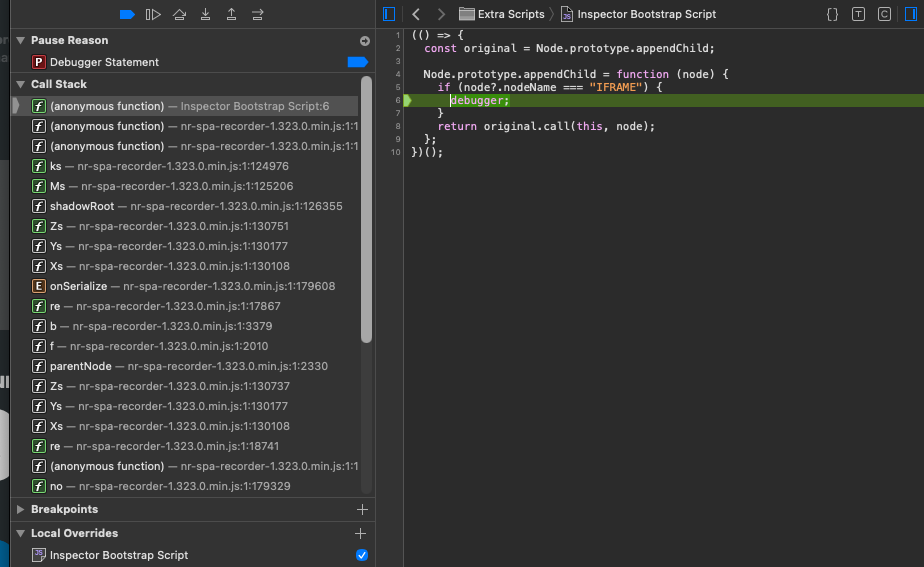
To catch the creation of the invisible frame, I initially set breakpoints on createElement and appendChild. That does not produce a useful answer. The app keeps crashing.
Using an Inspector Bootstrap Script, I add this script, targeting IFRAME nodes directly:
(() => {
  const original = Node.prototype.appendChild;
  Node.prototype.appendChild = function (node) {
    if (node?.nodeName === "IFRAME") {
      debugger;
    }
    return original.call(this, node);
  };
})();
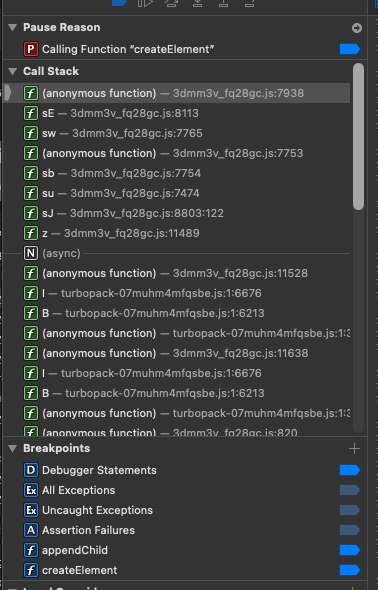
Web Inspector needs to be attached before reproducing the problem. I enable the script and the “Debugger Statements” breakpoint, then reload the page. This lets me intercept appendChild before the recorder runs.
Execution pauses before the frame is added to the DOM. At that point, I capture the call stack and the iframe's attributes. After execution resumes, the frame can be added and immediately removed, so a later call to document.querySelectorAll("iframe") may return an empty list.
The script reveals this call stack: startRecording → DOM serialization → New Relic SPA Recorder code → the intercepted appendChild → debugger.
After tracing it, I find the matching source:
if (!a) {
  let t;
  try {
    (t = document.createElement("iframe")),
      (t.hidden = !0),
      document.body.appendChild(t);
    const r = t.contentWindow;
    if (r) {
      const t = r[e].prototype;
      t && (l = t);
    }
  } finally {
    t && document.body.removeChild(t);
  }
}
5. New Relic Session Replay and the disappearing reproduction
New Relic runs as a browser-monitoring script, and the call stack identifies it as the code creating this particular frame. It retrieves browser prototypes from the temporary iframe's contentWindow, then removes the frame in a finally block. That explains why neither the static HTML nor a later DOM query reveals the iframe.
The recorder source is available here (version at the time of writing).
After I block the New Relic Session Replay script and reload the WebView, the page loads correctly and the crash does not occur. I remove the block and reload again. To my surprise, it still works. I need to establish whether the code suspected of creating the frame actually ran after I removed the block. After reloading, I do not see the recorder script being fetched. Removing the block alone does not confirm that I have re-entered the failing path.
That leads to another question: what determines whether the New Relic recorder starts? I find that the agent distinguishes between Session Replay being available and recording being enabled for a particular session. It also relies on session state. I inspect localStorage in Safari Web Inspector.
{
  "sessionReplayMode": 0,
  "sessionReplaySentFirstChunk": false,
  "sessionTraceMode": 1,
  "traceHarvestStarted": true,
  "cachedRumResponse": {
    "stn": 0,
    "err": 1,
    "ins": 1,
    "spa": 1,
    "sr": 1,
    "srs": 0,
    "st": 1,
    "sts": 2,
    "log": 2,
    "logapi": 2
  }
}
In the working session, I find sessionReplayMode: 0, meaning OFF, and sessionReplaySentFirstChunk: false. Recording is not active at that point, even though I am no longer blocking the script.
The value sessionReplayMode: 1 enables New Relic Session Replay recording. When I set it to 1 and reload the page, the crash returns. I change it again, and the page loads. The trigger is in a script executed by the page. The bugs that turn that trigger into a crash are in the app's navigation handling and WebView's native loading code.
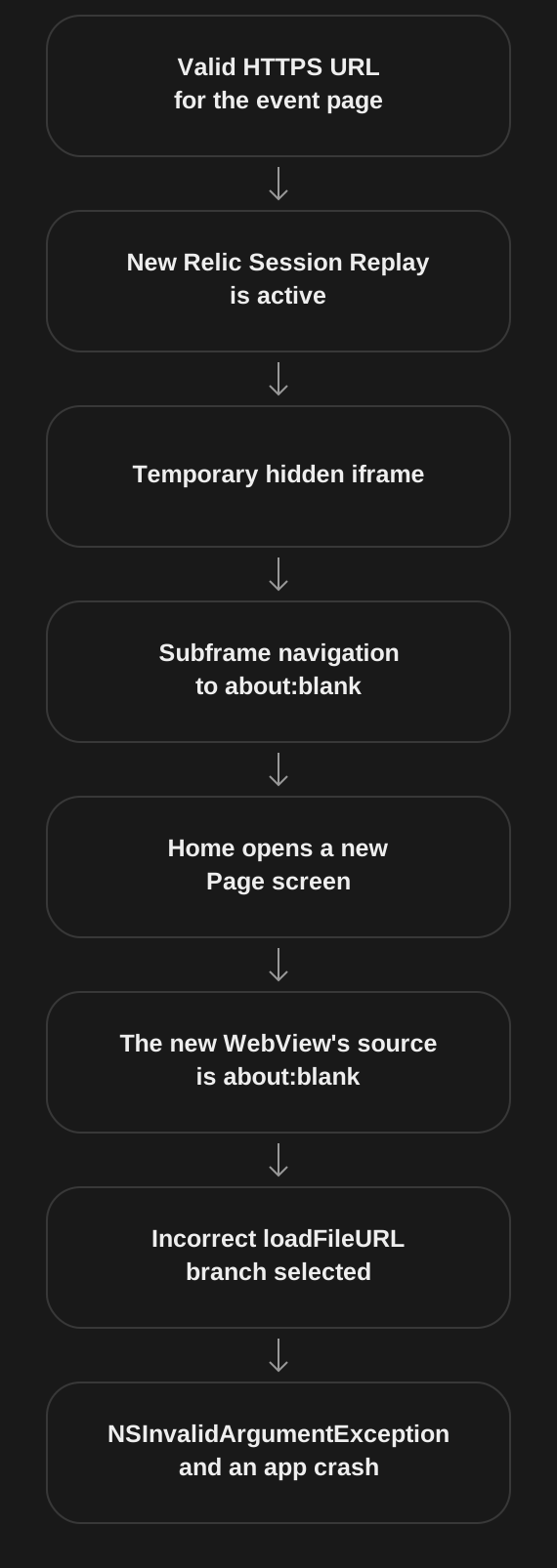
At this point, I can describe the full chain of events:
- The API and the data used by Home contain a valid HTTPS URL for the event page.
- The page starts the New Relic agent. When Session Replay starts for the session,
nr-spa-recorder-1.323.0.min.jsis loaded. - In the observed path, the recorder creates a hidden iframe without an explicit
src. It uses the frame'scontentWindowto obtain browser prototypes, then removes the frame. - WebView reports a navigation to
about:blankfor a subframe. The main document still has a valid HTTPS URL. - The Home handler receives
isTopFrame: falsebut still opens Page withabout:blank. - The new screen receives
pageUrl: "about:blank"in its navigation parameters, then passes that address to another WebView'ssource.uri. - The native code chooses how to load the URL based on whether it has a host.
about:blankdoes not, so it takes theloadFileURLbranch. about:blankis not a file URL. WebKit raises an exception that the app does not handle, and the process terminates.
Having the New Relic agent on the page does not mean Session Replay records every session. New Relic supports session sampling and error-triggered recording. On the inspected page, autoStart was enabled, with sampling_rate set to 1.0E-6 and error_sampling_rate set to 10.0. Reinstalling could change the page's session state and the outcome of the recording decision. Two sessions can therefore behave very differently.
A more durable fix would address both layers: ignore subframe navigations (isTopFrame: false) unless the app explicitly intends to handle them, and make the native code use loadFileURL only for file: URLs instead of inferring that from a missing host.
6. What I took away
The most misleading part was that each layer looked almost correct in isolation: the API returned a valid HTTPS URL, the page worked in a browser, and reinstalling could make the problem disappear. Only combining the JavaScript stack, WebView navigation events and native logs revealed the full path to the crash.
New Relic supplied the trigger: a temporary frame. The app incorrectly turned that frame's navigation into a new screen, and react-native-webview incorrectly classified the address as a file. When investigating a similar problem, it is worth logging more than the URL: include frame information, the handler's decision and the source passed to the new WebView. The context needed to handle the request correctly was lost at the boundaries between those layers.
